


 CorLab AI Agent
Welcome to your Personal Assistant
This Tech Assistant is designed to support you with clear insights into our company, our work, our services and the people behind our progress.
Powered by CorLab Tech © 2025
Twelve Headsets, One Lesson: I Built a Synchronized VR Platform for My Department
A 360° video of the inside of a cell is a wonderful thing to show a third-year medical student. A 360° video on twelve headsets that each need to be unlocked, opened, scrolled to the right file and pressed "play" by twelve different people is a wonderful way to lose fifteen minutes of a fifty-minute class.
That was the situation at the Pathophysiology discipline of USMF "Nicolae Testemițanu" when a set of Meta Quest headsets arrived at the department. The hardware was there. The content was there. What was missing was the piece in the middle: a way for one teacher to press play once and have every student see the same thing at the same second — and to know, from the front of the room, what each of them is actually looking at.
So I built it. It is called CoRLab VR Space, and this article is about what it does, how it is put together, and what the first classes with it looked like.

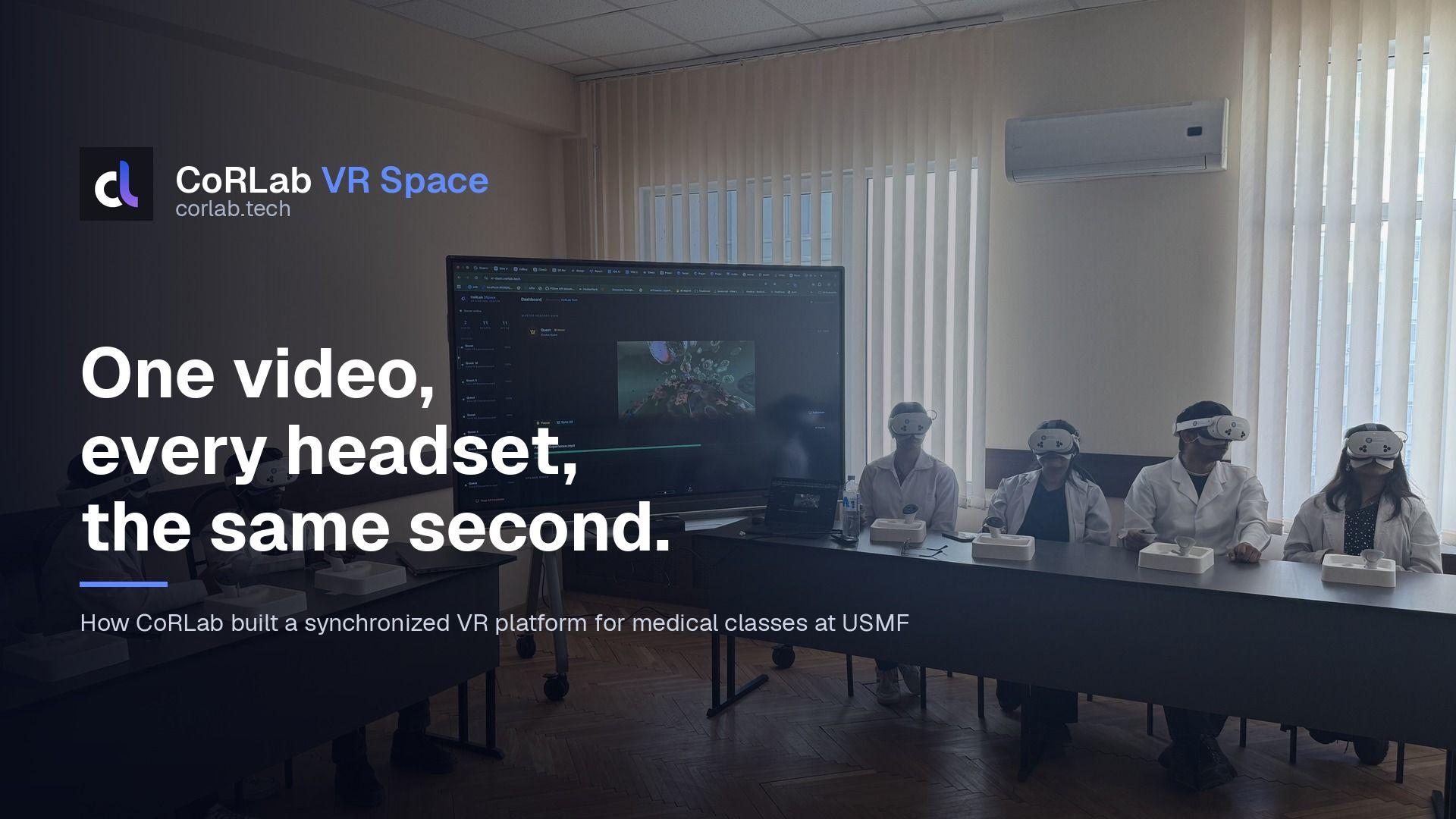
A practical class at USMF: eleven headsets connected, the master view mirrored on the room screen, and the dashboard open on the laptop. [01-classroom-synced-session.jpg]
What It Does, in Short
CoRLab VR Space has three parts that talk to each other over a local network: a web dashboard for the teacher, a small server, and a VR app installed on every headset.
The teacher opens the dashboard on a laptop or on the room's interactive screen. The headsets appear in a list as they power on — name, model, battery, what they are playing and how far in. The teacher picks a video from the library and presses "Play All". Every headset starts the same video. "Pause All", "Stop All" and "Sync All" do what they say. If one student took the headset off for a minute and fell behind, one click brings that headset back to the same timestamp as everyone else.
One headset is the master. Whatever the master sees is streamed back to the dashboard as a live picture, so the whole room — including students who are waiting their turn — can follow along on the big screen. And the master can also drive the class from inside VR: the student or teacher wearing it gets an in-VR menu with the video list and a "Play All" button, no laptop needed.

The dashboard: master headset view on the left, device list with per-headset controls, global Pause / Stop / Sync. (Screenshot from a demo environment.) [08-screenshot-dashboard-control.png]
The First Lesson Is Not About the Content
Every group goes through the same onboarding before we use VR for anything medical, and it happens in the first lesson of the semester. It takes about twenty minutes and covers four things: how to put the headset on and adjust it so the image is sharp, how to move safely in a room where fifteen other people are standing, the hygiene rules for shared equipment, and what to do if you feel dizzy — take it off, sit down, nobody will mind.
Then comes the first immersive demo: a short walk inside a living cell. One student wears the master headset, the rest watch the mirrored view on the screen, and then they rotate. By the end of the lesson everyone has had the headset on at least once, and by the next lesson the technology is boring — which is exactly what I want. A tool that nobody knows how to use safely is a tool that stays in the box.

First lesson with a new group: one student in the master headset, the rest following on the screen. Everyone rotates before the class ends. [03-onboarding-first-demo.jpg]

What the room sees: the master headset's view, mirrored live on the interactive display. [04-group-watching-master-view.jpg]
The Library
Videos are uploaded through the dashboard and land on the server. Anything that is not already an MP4 the headsets can play natively — MKV, MOV, AVI — is transcoded in the background with ffmpeg, and the card shows the progress while it happens. Each video is tagged (cardio, neuro, cancer, repro…) so a colleague can find the right one without asking me, and each one carries two settings the headset needs to render it correctly: the projection (2D flat, 180°, 360°, or the odd half-frame variants some publishers use) and the stereo layout (mono, side-by-side, over-under).
A lot of good medical 360° content lives on YouTube, and YouTube stores 360° video in a cubemap format that a headset player cannot show directly. So the repository also carries a small script that downloads a video and converts it to standard equirectangular, which is what the app expects. Not glamorous, but it is the difference between "we have a great video" and "we can show it on Tuesday".

The video library: tags, projection type, stereo layout and file size on every card. Green dot means the file is ready on the server. [07-screenshot-library.png]
Content Lives on the Headset, Not on the Wi-Fi
The most important design decision in the whole system is that videos are not streamed to the headsets during class. They are downloaded once, ahead of time, and played from local storage. A 2 GB file streamed to twelve devices over a classroom access point is a guaranteed buffering wheel on at least one of them; the same file already on the device just plays.
The dashboard has a "Download All" for a video and a "Device Management" page that shows what each headset has cached and lets you remove old files. There is also an auto-deploy switch: when it is on, any headset that powers up and connects gets the currently active videos pushed to it automatically. In practice I turn it on the day before a new topic, put the headsets on the charger, and the next morning they are ready.

Device Management: what each headset has downloaded, download progress, and the auto-deploy switch. (Screenshot from a demo environment.) [09-screenshot-device-management.png]

The headsets on the charging shelf at the department. Downloads happen here, the night before. [02-headsets-charging-row.jpg]
Small Things That Matter in a Classroom
A few features exist only because I was standing in the room and needed them.
- Hands up. A student who has a question does not have to take the headset off. Raising both hands above the head for half a second sends a signal, and a small hand icon appears next to that headset on the dashboard.
- Ping. Twelve identical white headsets on a table are impossible to tell apart. "Ping" plays a sound on one of them so you can find it, or get the attention of whoever is wearing it.
- Battery. Every headset reports its charge; the one at 12% goes back on the shelf before the lesson, not during it.
- Waiting room. Between videos the headset is not a black screen but a calm, dark-blue branded room with the menu floating at eye level. Nobody is disoriented when a video ends.

Inside the headset between videos: the waiting room and the in-VR menu. In master mode the menu gets a golden border and a "Play All" for every card. [10-screenshot-in-vr-menu.png]
How It Is Built
The repository is a pnpm monorepo with three applications and two shared packages.
- Backend — NestJS 10 with TypeORM on PostgreSQL 16, Socket.io for everything real-time, ffmpeg for transcoding, and a REST API with Swagger for the dashboard. Headsets are tracked in memory; the database holds videos, tags, users and the audit log.
- Dashboard — Next.js 14 (App Router), React 18, Tailwind, the Geist font, Socket.io client. Dark and light theme. It runs in any browser, which matters because the "computer" in the classroom is often the interactive display itself.
- VR client — Unity 2022 LTS with OpenXR and the Meta XR SDK, built for Quest 2, 3 and 3S. 360° playback uses Unity's panoramic skybox shader rather than an inverted sphere, which handles stereo layouts and rotation for free. Hand tracking and controllers both work.
- Infrastructure — Docker multi-stage builds on Node 20 Alpine, images published to GitHub Container Registry by GitHub Actions, and a docker-compose file for Postgres, Redis, MinIO and Adminer. The whole thing runs on one small box in the department.
Synchronization is deliberately simple. The server tells every headset to play the same file; from then on, each headset compares its own position with the master's reported position once per second and seeks if it has drifted by more than 100 milliseconds. A "Sync All" from the dashboard sends everyone to the master's timestamp and matches its paused/playing state. For lecture-style content — where the goal is that everyone sees the same organ at the same moment, not frame-locked multiplayer — this is more than enough, and it survives a headset going to sleep and waking up.
The master view on the dashboard is a JPEG stream: the master headset renders its camera to a 960×540 texture, encodes it at ten frames per second, and pushes it over the same WebSocket. It is not pretty up close, but on a room display it is exactly what you need to say "look at the top-left — that is the mitochondrion".

Where most of it happened: Unity on one screen, the dashboard on the other, and the headset on my head more often than I would like to admit. [06-dev-desk-unity.jpg]
Who Can Press Which Button
The first version had no authentication at all, which was fine in my office and not fine in a building with a few hundred students on the Wi-Fi. The current version has proper accounts with four roles — superadmin, admin, editor, viewer — where an editor can manage the library and a viewer can only run a class. New users join through invite links generated by an admin (no email server to configure), sessions use JWT with refresh tokens, and headsets authenticate with a shared access code that lives in the headset config. Every play, download, master change and login is written to an audit log with the user and the target, so when a video "disappeared" it took one filter to see who had deleted it and when.
The Rules I Wrote Before the Code
- No streaming during class. Content is downloaded to the headset in advance; the network is only used for commands and the master preview.
- One button for the room. Anything the teacher needs during a lesson must be reachable in one click from the dashboard — no menus inside menus.
- The student never touches the headset UI. Play, pause, sync and stop come from the front of the room. The in-VR menu exists for the master only.
- Content stays portable. Standard MP4 in, standard MP4 out; no proprietary format, no lock-in to my app.
- It must work offline. The department network has no internet access from the classroom, so nothing in the play path may call out to the cloud.
Lessons Learned from the Hard Parts
Big downloads kill WebSockets. The Unity client downloads a 2 GB file on the main thread, and while it does, it cannot answer the server's ping. With Socket.io's default 20-second timeout the server decided the headset was dead, dropped it, and the dashboard showed it disconnecting in the middle of a download that was, in fact, going fine. The fix was boring — a two-minute ping timeout on the server — but it took an afternoon of staring at the wrong logs to find.
YouTube 360° is not 360° video. The first "360°" file I put on a headset showed six warped squares. YouTube stores immersive video as an equi-angular cubemap; a panoramic player expects equirectangular. Now there is a conversion script in the repo and a note in the upload dialog, and I have not been surprised since.
Optimistic status beats honest status. When the teacher presses Pause, the dashboard used to wait for each headset to confirm before updating the badge. On a busy classroom network that lag was long enough that people pressed Pause twice, which resumed the video. Now the dashboard updates the badge immediately and corrects itself later if the headset disagrees. It looks faster and, more importantly, nobody double-clicks.
Headsets do not have names. Twelve devices called "Quest 3" is not a list, it is a puzzle. The client now sends a device name that can be set per headset, and the ping button exists for the days when the names have not been set.
What Is Still Missing
- Headset state is kept in memory on the server. If the backend restarts mid-lesson, the headsets reconnect on their own, but the master assignment is lost and has to be set again.
- One room at a time. The server has no concept of "class A in room 3 and class B in room 5". Right now that means one server per room, which is fine for us and not fine for a whole faculty.
- Meta Quest only. The client is written against OpenXR, so Pico support is mostly a build target and a test, but I have not done it.
- No analytics yet. I know which headset played which video; I do not yet know where students looked, which is the interesting question for a pathophysiology teacher.
Why This Matters for Medical Education
A student who has walked through a coronary artery in three dimensions does not forget where the left anterior descending branch is. That is not a claim about VR in general — it is what I see in the questions students ask after a session compared with the questions they ask after a slide. The technology to do this has been affordable for a while. What was missing in our department was not a headset or a video, but the twenty-minute onboarding, the one-click "Play All", and the confidence that on Tuesday at 8:00 the twelve headsets will do the same thing at the same time.

Six headsets, one cell, one Play button. [05-selfie-cell-on-screen.jpg]
Key Takeaways from the Build
- Synchronization for lectures is a 100 ms drift check once per second, not a distributed clock. Keep it simple.
- Download ahead, play local. The classroom Wi-Fi is the weakest component in the room; design so that it only carries commands.
- The dashboard is for the teacher, the headset UI is for nobody. Every control a student has to touch is a minute of class time.
- Roles and an audit log are not enterprise features; they are what lets you hand the system to a colleague and go on holiday.
- The hardest bugs were not in VR. They were in timeouts, container formats and optimistic UI — the same places they always are.
A 360° video of the inside of a cell is a wonderful thing to show a third-year medical student. A 360° video on twelve headsets that each need to be unlocked, opened, scrolled to the right file and pressed "play" by twelve different people is a wonderful way to lose fifteen minutes of a fifty-minute class.
That was the situation at the Pathophysiology discipline of USMF "Nicolae Testemițanu" when a set of Meta Quest headsets arrived at the department. The hardware was there. The content was there. What was missing was the piece in the middle: a way for one teacher to press play once and have every student see the same thing at the same second — and to know, from the front of the room, what each of them is actually looking at.
So I built it. It is called CoRLab VR Space, and this article is about what it does, how it is put together, and what the first classes with it looked like.
A practical class at USMF: eleven headsets connected, the master view mirrored on the room screen, and the dashboard open on the laptop. [01-classroom-synced-session.jpg]
What It Does, in Short
CoRLab VR Space has three parts that talk to each other over a local network: a web dashboard for the teacher, a small server, and a VR app installed on every headset.
The teacher opens the dashboard on a laptop or on the room's interactive screen. The headsets appear in a list as they power on — name, model, battery, what they are playing and how far in. The teacher picks a video from the library and presses "Play All". Every headset starts the same video. "Pause All", "Stop All" and "Sync All" do what they say. If one student took the headset off for a minute and fell behind, one click brings that headset back to the same timestamp as everyone else.
One headset is the master. Whatever the master sees is streamed back to the dashboard as a live picture, so the whole room — including students who are waiting their turn — can follow along on the big screen. And the master can also drive the class from inside VR: the student or teacher wearing it gets an in-VR menu with the video list and a "Play All" button, no laptop needed.
The dashboard: master headset view on the left, device list with per-headset controls, global Pause / Stop / Sync. (Screenshot from a demo environment.) [08-screenshot-dashboard-control.png]
The First Lesson Is Not About the Content
Every group goes through the same onboarding before we use VR for anything medical, and it happens in the first lesson of the semester. It takes about twenty minutes and covers four things: how to put the headset on and adjust it so the image is sharp, how to move safely in a room where fifteen other people are standing, the hygiene rules for shared equipment, and what to do if you feel dizzy — take it off, sit down, nobody will mind.
Then comes the first immersive demo: a short walk inside a living cell. One student wears the master headset, the rest watch the mirrored view on the screen, and then they rotate. By the end of the lesson everyone has had the headset on at least once, and by the next lesson the technology is boring — which is exactly what I want. A tool that nobody knows how to use safely is a tool that stays in the box.
First lesson with a new group: one student in the master headset, the rest following on the screen. Everyone rotates before the class ends. [03-onboarding-first-demo.jpg]
What the room sees: the master headset's view, mirrored live on the interactive display. [04-group-watching-master-view.jpg]
The Library
Videos are uploaded through the dashboard and land on the server. Anything that is not already an MP4 the headsets can play natively — MKV, MOV, AVI — is transcoded in the background with ffmpeg, and the card shows the progress while it happens. Each video is tagged (cardio, neuro, cancer, repro…) so a colleague can find the right one without asking me, and each one carries two settings the headset needs to render it correctly: the projection (2D flat, 180°, 360°, or the odd half-frame variants some publishers use) and the stereo layout (mono, side-by-side, over-under).
A lot of good medical 360° content lives on YouTube, and YouTube stores 360° video in a cubemap format that a headset player cannot show directly. So the repository also carries a small script that downloads a video and converts it to standard equirectangular, which is what the app expects. Not glamorous, but it is the difference between "we have a great video" and "we can show it on Tuesday".
The video library: tags, projection type, stereo layout and file size on every card. Green dot means the file is ready on the server. [07-screenshot-library.png]
Content Lives on the Headset, Not on the Wi-Fi
The most important design decision in the whole system is that videos are not streamed to the headsets during class. They are downloaded once, ahead of time, and played from local storage. A 2 GB file streamed to twelve devices over a classroom access point is a guaranteed buffering wheel on at least one of them; the same file already on the device just plays.
The dashboard has a "Download All" for a video and a "Device Management" page that shows what each headset has cached and lets you remove old files. There is also an auto-deploy switch: when it is on, any headset that powers up and connects gets the currently active videos pushed to it automatically. In practice I turn it on the day before a new topic, put the headsets on the charger, and the next morning they are ready.
Device Management: what each headset has downloaded, download progress, and the auto-deploy switch. (Screenshot from a demo environment.) [09-screenshot-device-management.png]
The headsets on the charging shelf at the department. Downloads happen here, the night before. [02-headsets-charging-row.jpg]
Small Things That Matter in a Classroom
A few features exist only because I was standing in the room and needed them.
- Hands up. A student who has a question does not have to take the headset off. Raising both hands above the head for half a second sends a signal, and a small hand icon appears next to that headset on the dashboard.
- Ping. Twelve identical white headsets on a table are impossible to tell apart. "Ping" plays a sound on one of them so you can find it, or get the attention of whoever is wearing it.
- Battery. Every headset reports its charge; the one at 12% goes back on the shelf before the lesson, not during it.
- Waiting room. Between videos the headset is not a black screen but a calm, dark-blue branded room with the menu floating at eye level. Nobody is disoriented when a video ends.
Inside the headset between videos: the waiting room and the in-VR menu. In master mode the menu gets a golden border and a "Play All" for every card. [10-screenshot-in-vr-menu.png]
How It Is Built
The repository is a pnpm monorepo with three applications and two shared packages.
- Backend — NestJS 10 with TypeORM on PostgreSQL 16, Socket.io for everything real-time, ffmpeg for transcoding, and a REST API with Swagger for the dashboard. Headsets are tracked in memory; the database holds videos, tags, users and the audit log.
- Dashboard — Next.js 14 (App Router), React 18, Tailwind, the Geist font, Socket.io client. Dark and light theme. It runs in any browser, which matters because the "computer" in the classroom is often the interactive display itself.
- VR client — Unity 2022 LTS with OpenXR and the Meta XR SDK, built for Quest 2, 3 and 3S. 360° playback uses Unity's panoramic skybox shader rather than an inverted sphere, which handles stereo layouts and rotation for free. Hand tracking and controllers both work.
- Infrastructure — Docker multi-stage builds on Node 20 Alpine, images published to GitHub Container Registry by GitHub Actions, and a docker-compose file for Postgres, Redis, MinIO and Adminer. The whole thing runs on one small box in the department.
Synchronization is deliberately simple. The server tells every headset to play the same file; from then on, each headset compares its own position with the master's reported position once per second and seeks if it has drifted by more than 100 milliseconds. A "Sync All" from the dashboard sends everyone to the master's timestamp and matches its paused/playing state. For lecture-style content — where the goal is that everyone sees the same organ at the same moment, not frame-locked multiplayer — this is more than enough, and it survives a headset going to sleep and waking up.
The master view on the dashboard is a JPEG stream: the master headset renders its camera to a 960×540 texture, encodes it at ten frames per second, and pushes it over the same WebSocket. It is not pretty up close, but on a room display it is exactly what you need to say "look at the top-left — that is the mitochondrion".
Where most of it happened: Unity on one screen, the dashboard on the other, and the headset on my head more often than I would like to admit. [06-dev-desk-unity.jpg]
Who Can Press Which Button
The first version had no authentication at all, which was fine in my office and not fine in a building with a few hundred students on the Wi-Fi. The current version has proper accounts with four roles — superadmin, admin, editor, viewer — where an editor can manage the library and a viewer can only run a class. New users join through invite links generated by an admin (no email server to configure), sessions use JWT with refresh tokens, and headsets authenticate with a shared access code that lives in the headset config. Every play, download, master change and login is written to an audit log with the user and the target, so when a video "disappeared" it took one filter to see who had deleted it and when.
The Rules I Wrote Before the Code
- No streaming during class. Content is downloaded to the headset in advance; the network is only used for commands and the master preview.
- One button for the room. Anything the teacher needs during a lesson must be reachable in one click from the dashboard — no menus inside menus.
- The student never touches the headset UI. Play, pause, sync and stop come from the front of the room. The in-VR menu exists for the master only.
- Content stays portable. Standard MP4 in, standard MP4 out; no proprietary format, no lock-in to my app.
- It must work offline. The department network has no internet access from the classroom, so nothing in the play path may call out to the cloud.
Lessons Learned from the Hard Parts
Big downloads kill WebSockets. The Unity client downloads a 2 GB file on the main thread, and while it does, it cannot answer the server's ping. With Socket.io's default 20-second timeout the server decided the headset was dead, dropped it, and the dashboard showed it disconnecting in the middle of a download that was, in fact, going fine. The fix was boring — a two-minute ping timeout on the server — but it took an afternoon of staring at the wrong logs to find.
YouTube 360° is not 360° video. The first "360°" file I put on a headset showed six warped squares. YouTube stores immersive video as an equi-angular cubemap; a panoramic player expects equirectangular. Now there is a conversion script in the repo and a note in the upload dialog, and I have not been surprised since.
Optimistic status beats honest status. When the teacher presses Pause, the dashboard used to wait for each headset to confirm before updating the badge. On a busy classroom network that lag was long enough that people pressed Pause twice, which resumed the video. Now the dashboard updates the badge immediately and corrects itself later if the headset disagrees. It looks faster and, more importantly, nobody double-clicks.
Headsets do not have names. Twelve devices called "Quest 3" is not a list, it is a puzzle. The client now sends a device name that can be set per headset, and the ping button exists for the days when the names have not been set.
What Is Still Missing
- Headset state is kept in memory on the server. If the backend restarts mid-lesson, the headsets reconnect on their own, but the master assignment is lost and has to be set again.
- One room at a time. The server has no concept of "class A in room 3 and class B in room 5". Right now that means one server per room, which is fine for us and not fine for a whole faculty.
- Meta Quest only. The client is written against OpenXR, so Pico support is mostly a build target and a test, but I have not done it.
- No analytics yet. I know which headset played which video; I do not yet know where students looked, which is the interesting question for a pathophysiology teacher.
Why This Matters for Medical Education
A student who has walked through a coronary artery in three dimensions does not forget where the left anterior descending branch is. That is not a claim about VR in general — it is what I see in the questions students ask after a session compared with the questions they ask after a slide. The technology to do this has been affordable for a while. What was missing in our department was not a headset or a video, but the twenty-minute onboarding, the one-click "Play All", and the confidence that on Tuesday at 8:00 the twelve headsets will do the same thing at the same time.
Six headsets, one cell, one Play button. [05-selfie-cell-on-screen.jpg]
Key Takeaways from the Build
- Synchronization for lectures is a 100 ms drift check once per second, not a distributed clock. Keep it simple.
- Download ahead, play local. The classroom Wi-Fi is the weakest component in the room; design so that it only carries commands.
- The dashboard is for the teacher, the headset UI is for nobody. Every control a student has to touch is a minute of class time.
- Roles and an audit log are not enterprise features; they are what lets you hand the system to a colleague and go on holiday.
- The hardest bugs were not in VR. They were in timeouts, container formats and optimistic UI — the same places they always are.

Mihai Dascal
I teach pathophysiology to third-year medical students at USMF "Nicolae Testemițanu" and I build software for healthcare at CoRLab Tech. CoRLab VR Space, like the live-lesson platform I wrote about last week, exists because I was the one standing in the classroom with a problem and the one who could write the tool that solved it. If your department, clinic or training centre has a shelf of headsets and no way to run them as one — we have done this once already and would be glad to do it again.

6+
Years in CorLab Tech

14+
Years of Experience


Our Best Insights
Browse More Articles
Want to know what’s trending in the tech world? Our articles break it all down - quickly and clearly.
 Time to read: 11 min
Healthcare

Artificial Intelligence
November 4th, 2024
Machine Learning in Healthcare: Benefits, Use Cases, and Limits
Where machine learning helps in healthcare, why so many projects stall after the pilot, and when a simple rule beats a model.

 Time to read: 5 min
Healthcare
October 3rd, 2024
Digital Transformation in Healthcare: What It Means in Software Terms
From clinics to enterprise systems, digital transformation is making healthcare software more accessible, efficient, and patient-focused.