


 CorLab AI Agent
Welcome to your Personal Assistant
This Tech Assistant is designed to support you with clear insights into our company, our work, our services and the people behind our progress.
Powered by CorLab Tech © 2025
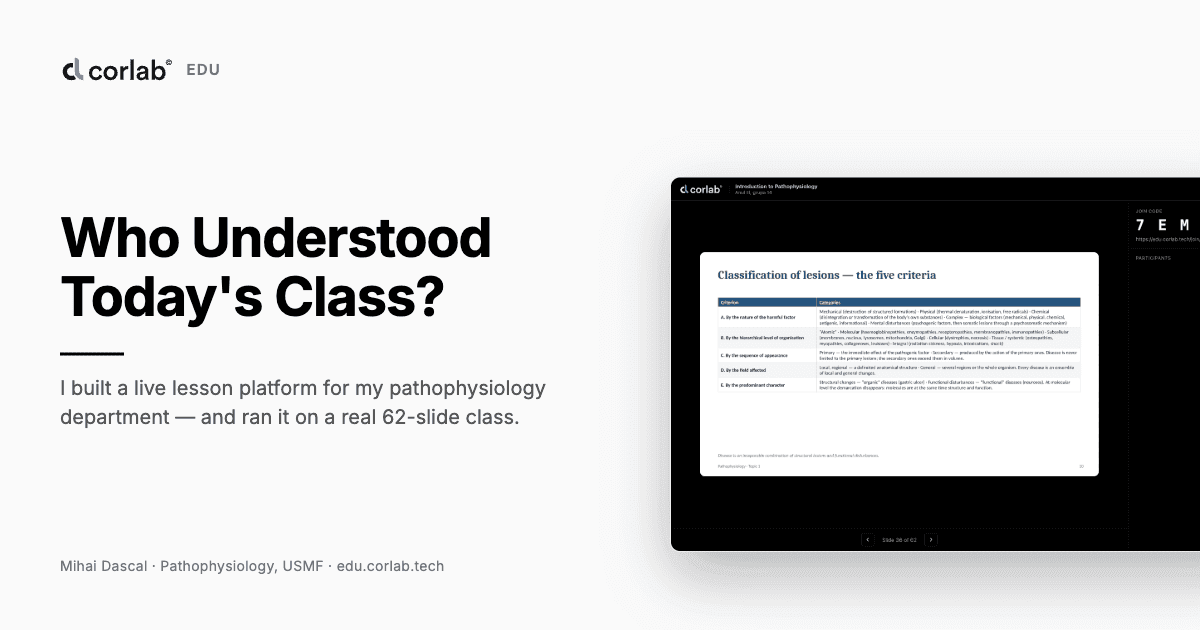
Who Understood Today's Class? I Built a Live Lesson Platform for My Department
An Equipped Room, and a Question I Could Never Answer
In every practical pathophysiology class with third-year students I ask myself the same question and never get an answer: how many of them actually understood what I just taught? Two or three speak up; the rest stay quiet, and that silence tells me nothing. I find out at the exam, far too late.
The computer labs at our department — Pathology, pathophysiology discipline — are fully equipped. What was missing was a tool that put them to work in an ordinary class, without bending something built for another purpose into a shape it was never meant for. So over the summer I built it. It runs at edu.corlab.tech, on a real 62-slide pathophysiology deck.
What It Does, in Short
CorLab EDU starts from the material I already have: a PowerPoint deck. I upload it, the platform renders it slide by slide, and a language model proposes questions anchored in the text of each slide — not generic pathophysiology questions, but questions tied to what that slide says. Each proposal arrives with the passage that produced it, and I accept it, reject it, or leave it unreviewed.
In class I start the lesson and get a short code, which I read out loud. Students type it on their own laptops and pick their name from the class list — no account, no password, no email. The slides I advance appear on their screens in sync. When I open a question they answer from their own machine, and when I close it I see who answered what.

The three moments that matter: I upload a deck, students join with a code and no account, and I decide the grade the AI proposed. The detailed eleven-step diagram is unreadable at page width and stays a separate file, flux.svg.
From PPTX to Questions
A topic can hold several presentations of the same content — one English, one Romanian — but exactly one is active at a time. Only the active one gets taught.

The topic “Introduction to Pathophysiology” and its presentation: 62 slides, imported straight from the original PPTX. The teacher interface here is English — the language is a per-account preference; the platform ships ro, en, fr and ru.
I open the editor and the slides are already rendered, one by one, ready for questions.

The topic editor. The title slide has no questions yet — the AI's work starts on slides that carry course content.
On those I ask the model to propose. It returns single choice, multiple choice and free text, each carrying the exact passage that produced it, so I can check whether the question matches the material or merely sounds like it does.

Proposals for slide 36, “Classification of lesions”. Two accepted; a free-text one still waiting, with its source passage attached. What I don't accept never reaches a student.
The Live Lesson
I start the lesson and the join code goes up on the projected screen.

The join code, readable from the back of the room, with the link under it and the participant count at zero. No AI call sits on this path — starting a lesson waits for nothing.
I open a question tied to the current slide and watch how many have answered — but not what, so I don't lean on the students who haven't sent yet.

A question open during class. The panel lists the four students who joined, and says plainly that answers stay hidden until I close it — hidden from me too.
On Their Own Machines, With No Account
A student joins with the code, picks their name from the class list, and that is the whole of it. Their name is everything the platform knows about them, alongside answers and grades. With no passwords there is no account to break into and no student emails to protect.
 |  |  |
Three screens from a student's device: picking a name, choosing an answer, the confirmation. The interface is English because that is this class's language; the question text stays as written — course content is never machine translated.
Who Answered, and What
I close the question and see what I had been keeping from myself: the distribution of answers, then, by name, who chose what.

The closed question: the distribution with the correct option ticked, and the nominal list — name, answer, score. Green and red appear here and only here; those colours are reserved for grading.
Scoring is 0 to 1 per question, and the final grade comes out of the sum: 1 + 9 × (earned / available) — the 1 to 10 scale every grade at the university uses. Correct a score later and the grade recalculates itself, with the correction kept in the history. The answer's own text is immutable.
The Rules I Wrote Before the Code
Five rules, non-negotiable from the start:
- UI–API parity. Anything done from the interface can be done through the API, with the same validation. That test ran from the first day of code.
- The AI grades, the teacher decides. It never modifies an answer; it proposes a score and an explanation. The student never learns the AI graded them, and never sees the explanation.
- The class doesn't stop. No AI call sits on the critical path of a lesson. “To be graded” is a valid state, not an error.
- PPTX in, PPTX out. A teacher's work does not get trapped in a platform.
- The minimum about students. Names, answers, grades. No student accounts, no passwords, no emails.
Spec-First, Not Vibe Coding
I built CorLab EDU spec-first, with GitHub Spec Kit: 66 requirements in 12 user stories and over 100 tasks, each tied to a requirement rather than written because it was convenient. The rules above have tests defending them.
“32% of organizations have stopped buying software because they build it in-house with coding agents, with tech and healthcare leading the trend.” — McKinsey, State of AI survey, 2026 |
I don't quote that to validate my decision, but because it explains why building something this specific to one department became realistic this year: no product team, no software budget — a careful spec, and coding agents to execute it.
The Final Result
A platform at edu.corlab.tech with a real 62-slide pathophysiology deck, questions already accepted, ready for a class with group 14. Not a what-if platform: something I can open tomorrow at 8 and know by 8:50, rather than at the exam, who understood.
Key Takeaways from the Build
- The spec paid for itself in contradictions. Requirements written first are where design errors surface, while they are still sentences.
- Privacy is cheapest when the data is never collected. No student accounts meant no reset flow, no stored emails, nothing to leak.
- Keep the model off the critical path. Every AI call runs ahead of the class or behind it, never inside it.
- Equipped rooms don't teach by themselves. The hardware had been there for years; what changed was one small tool built for it.
Why This Matters for Medical Education
Pathophysiology sits between the basic sciences and the clinic. A student who leaves with the wrong model of how a lesion becomes a disease carries it into clinical reasoning, and the cheapest moment to catch that is the fifty minutes in which it forms.
It also matters that the department teaching the subject built this rather than bought it: the tool knows what a practical class looks like because the person who needed it wrote the spec.
Lessons Learned from the Hard Parts
The spec contradicted itself, and the code obeyed the wrong half
One requirement said the AI proposes questions from the text of the slide. Another said it must ground itself in the topic's source materials. Both were reasonable; together they were incoherent, and the implementation followed the second and made materials mandatory. So a teacher who had just uploaded a deck — the starting state of every topic — could not use the AI at all. I fixed the specification first, the code second.
The expensive bugs are the silent ones
Once the AI did start proposing, it returned nothing. The call succeeded, the model came back with four good questions, and the parser threw all of them away: it answered single_choice where the parser accepted only cs, cm and free_text, and discarded the rest without an error anywhere. The teacher read “the AI could not propose anything” and had no reason to doubt it. The prompt had never listed the permitted values.
The teacher was silently handed the student's view
The realtime gateway checked the student cookie first, so a browser holding both cookies degraded the teacher's screen into the student one. The nominal list and the question controls disappeared, but the slide and the join code stayed — so it did not look broken, just emptier. It happens the first time a teacher joins their own lesson to see what the class sees.
The test suite blocked a real import
Test runs enqueued jobs on the shared queue and then deleted their own data, leaving the jobs behind. 488 orphans had piled up in front of a genuine PPTX import, which simply sat there. The tests have their own queue now.
What is still open
The USMF institutional login over OIDC is implemented but not verified end to end; local accounts carry the load until I have the real endpoint. And with more than one API replica, live events reach only the students connected to the replica that emitted them — enough for a group of 15, not for a whole year.
An Equipped Room, and a Question I Could Never Answer
In every practical pathophysiology class with third-year students I ask myself the same question and never get an answer: how many of them actually understood what I just taught? Two or three speak up; the rest stay quiet, and that silence tells me nothing. I find out at the exam, far too late.
The computer labs at our department — Pathology, pathophysiology discipline — are fully equipped. What was missing was a tool that put them to work in an ordinary class, without bending something built for another purpose into a shape it was never meant for. So over the summer I built it. It runs at edu.corlab.tech, on a real 62-slide pathophysiology deck.
What It Does, in Short
CorLab EDU starts from the material I already have: a PowerPoint deck. I upload it, the platform renders it slide by slide, and a language model proposes questions anchored in the text of each slide — not generic pathophysiology questions, but questions tied to what that slide says. Each proposal arrives with the passage that produced it, and I accept it, reject it, or leave it unreviewed.
In class I start the lesson and get a short code, which I read out loud. Students type it on their own laptops and pick their name from the class list — no account, no password, no email. The slides I advance appear on their screens in sync. When I open a question they answer from their own machine, and when I close it I see who answered what.
The three moments that matter: I upload a deck, students join with a code and no account, and I decide the grade the AI proposed. The detailed eleven-step diagram is unreadable at page width and stays a separate file, flux.svg.
From PPTX to Questions
A topic can hold several presentations of the same content — one English, one Romanian — but exactly one is active at a time. Only the active one gets taught.
The topic “Introduction to Pathophysiology” and its presentation: 62 slides, imported straight from the original PPTX. The teacher interface here is English — the language is a per-account preference; the platform ships ro, en, fr and ru.
I open the editor and the slides are already rendered, one by one, ready for questions.
The topic editor. The title slide has no questions yet — the AI's work starts on slides that carry course content.
On those I ask the model to propose. It returns single choice, multiple choice and free text, each carrying the exact passage that produced it, so I can check whether the question matches the material or merely sounds like it does.
Proposals for slide 36, “Classification of lesions”. Two accepted; a free-text one still waiting, with its source passage attached. What I don't accept never reaches a student.
The Live Lesson
I start the lesson and the join code goes up on the projected screen.
The join code, readable from the back of the room, with the link under it and the participant count at zero. No AI call sits on this path — starting a lesson waits for nothing.
I open a question tied to the current slide and watch how many have answered — but not what, so I don't lean on the students who haven't sent yet.
A question open during class. The panel lists the four students who joined, and says plainly that answers stay hidden until I close it — hidden from me too.
On Their Own Machines, With No Account
A student joins with the code, picks their name from the class list, and that is the whole of it. Their name is everything the platform knows about them, alongside answers and grades. With no passwords there is no account to break into and no student emails to protect.
| | |
Three screens from a student's device: picking a name, choosing an answer, the confirmation. The interface is English because that is this class's language; the question text stays as written — course content is never machine translated.
Who Answered, and What
I close the question and see what I had been keeping from myself: the distribution of answers, then, by name, who chose what.
The closed question: the distribution with the correct option ticked, and the nominal list — name, answer, score. Green and red appear here and only here; those colours are reserved for grading.
Scoring is 0 to 1 per question, and the final grade comes out of the sum: 1 + 9 × (earned / available) — the 1 to 10 scale every grade at the university uses. Correct a score later and the grade recalculates itself, with the correction kept in the history. The answer's own text is immutable.
The Rules I Wrote Before the Code
Five rules, non-negotiable from the start:
- UI–API parity. Anything done from the interface can be done through the API, with the same validation. That test ran from the first day of code.
- The AI grades, the teacher decides. It never modifies an answer; it proposes a score and an explanation. The student never learns the AI graded them, and never sees the explanation.
- The class doesn't stop. No AI call sits on the critical path of a lesson. “To be graded” is a valid state, not an error.
- PPTX in, PPTX out. A teacher's work does not get trapped in a platform.
- The minimum about students. Names, answers, grades. No student accounts, no passwords, no emails.
Spec-First, Not Vibe Coding
I built CorLab EDU spec-first, with GitHub Spec Kit: 66 requirements in 12 user stories and over 100 tasks, each tied to a requirement rather than written because it was convenient. The rules above have tests defending them.
“32% of organizations have stopped buying software because they build it in-house with coding agents, with tech and healthcare leading the trend.” — McKinsey, State of AI survey, 2026 |
I don't quote that to validate my decision, but because it explains why building something this specific to one department became realistic this year: no product team, no software budget — a careful spec, and coding agents to execute it.
The Final Result
A platform at edu.corlab.tech with a real 62-slide pathophysiology deck, questions already accepted, ready for a class with group 14. Not a what-if platform: something I can open tomorrow at 8 and know by 8:50, rather than at the exam, who understood.
Key Takeaways from the Build
- The spec paid for itself in contradictions. Requirements written first are where design errors surface, while they are still sentences.
- Privacy is cheapest when the data is never collected. No student accounts meant no reset flow, no stored emails, nothing to leak.
- Keep the model off the critical path. Every AI call runs ahead of the class or behind it, never inside it.
- Equipped rooms don't teach by themselves. The hardware had been there for years; what changed was one small tool built for it.
Why This Matters for Medical Education
Pathophysiology sits between the basic sciences and the clinic. A student who leaves with the wrong model of how a lesion becomes a disease carries it into clinical reasoning, and the cheapest moment to catch that is the fifty minutes in which it forms.
It also matters that the department teaching the subject built this rather than bought it: the tool knows what a practical class looks like because the person who needed it wrote the spec.
Lessons Learned from the Hard Parts
The spec contradicted itself, and the code obeyed the wrong half
One requirement said the AI proposes questions from the text of the slide. Another said it must ground itself in the topic's source materials. Both were reasonable; together they were incoherent, and the implementation followed the second and made materials mandatory. So a teacher who had just uploaded a deck — the starting state of every topic — could not use the AI at all. I fixed the specification first, the code second.
The expensive bugs are the silent ones
Once the AI did start proposing, it returned nothing. The call succeeded, the model came back with four good questions, and the parser threw all of them away: it answered single_choice where the parser accepted only cs, cm and free_text, and discarded the rest without an error anywhere. The teacher read “the AI could not propose anything” and had no reason to doubt it. The prompt had never listed the permitted values.
The teacher was silently handed the student's view
The realtime gateway checked the student cookie first, so a browser holding both cookies degraded the teacher's screen into the student one. The nominal list and the question controls disappeared, but the slide and the join code stayed — so it did not look broken, just emptier. It happens the first time a teacher joins their own lesson to see what the class sees.
The test suite blocked a real import
Test runs enqueued jobs on the shared queue and then deleted their own data, leaving the jobs behind. 488 orphans had piled up in front of a genuine PPTX import, which simply sat there. The tests have their own queue now.
What is still open
The USMF institutional login over OIDC is implemented but not verified end to end; local accounts carry the load until I have the real endpoint. And with more than one API replica, live events reach only the students connected to the replica that emitted them — enough for a group of 15, not for a whole year.

Mihai Dascal
I teach pathophysiology to third-year medical students at USMF and build software for healthcare. That combination is the whole reason this project exists: I was the one standing in the classroom without an answer, and the one who could write the tool that gave me one. Most of what I build follows the same pattern — a real problem I have seen up close, solved with software that stays out of the way.

6+
Years in CorLab Tech

14+
Years of Experience


Our Best Insights
Browse More Articles
Want to know what’s trending in the tech world? Our articles break it all down - quickly and clearly.

 Time to read: 8 min
Artificial Intelligence

Software Development
November 18th, 2024
LLM Integration in App Development: What Works in Production
API, RAG, or fine-tuning? How to choose an LLM, ground it in your data, and keep token costs under control once the feature is in production.

 Time to read: 11 min
Healthcare
Artificial Intelligence
November 4th, 2024
Machine Learning in Healthcare: Benefits, Use Cases, and Limits
Where machine learning helps in healthcare, why so many projects stall after the pilot, and when a simple rule beats a model.